Note : To Better Understand How the HACT Assurance Plan calculates Assurance Activities for Both Programmatic Visits and Spot Checks please see guidance on “Understanding the HACT Assurance Plan” here
A. Implementing Partner Information: Includes the key information about the implementing partner from the Partner details in VISION. This information, including the risk rating, type of assessment and date of assessment, can be updated by submitting a completed Vendor Master template to GSSC. Shared IP information is entered in the partner details in eTools Partnership Management Module.
B. Link : The “Link” column links to the Implementing Partners PMP module in etools and its key purpose is for users to edit the specific IP’s Assurance Plan activities (programmatic and financial)
C. IP Type : Notes if an IP is a CSO or a Government partner
B. Flags: Two automated flags are available in eTools: 1.) Clock - when it is the last year of validity of the assessment. Country offices will need to commission a new assessment if they will be transferring more than $100,000 next year or update the risk rating. 2) Warning sign - when an implementing partner does not have a micro assessment and is receiving more than $50,000. Country office will be requred to conduct a micro assessment or update the risk rating if they will transfer more htan $100,000 to the partner during the year.
C. Cash Transfers Jan-Dec (Current Year): Displays the total amount [DCT Paid + Direct Payments + Reimbursements Paid] to the implementing partner for the period 1st of January to the date of the report. The amount is for information purposes and does not influence the calculation of the minimum assurance requirements.
D. Net Cash Transfers October to September: The amount displays the total [Direct Cash Transfer paid + Direct Payments + Reimbursements - Refunds] for the period October to September. It is used to calculate the minimum required programmatic checks.
E. Highest Risk Rating : The Highest Risk Rating is calculated based on the “HACT Risk Rating” and “SEA Risk Rating”, depending on which one is higher. If both risk ratings are the same, then it displays the “SEA Risk Rating”.
F. HACT Risk Rating : The HACT Risk Rating refers to the HACT Micro Assessment risk rating. Micro assessments are undertaken, or high-risk is assumed, for implementing partners that are expected to receive US$100,000 or more in a year from UNICEF.
G. SEA Risk Rating : The SEA Risk Rating refers to the PSEA Risk Rating of the IP. UNICEF requires PSEA assessments to be completed for all new CSO partners regardless of the amount disbursed before entering into a partnership, as per the Procedure for Managing Risks of Sexual Exploitation and Abuse in Implementing Partnerships. As of July 1st 2021 several changes in VISION and eTools were activated in order to align with the business requirements of the PSEA Procedure. As part of this revision please be informed that VISION no longer allows cash transactions until a PSEA assessment is conducted and its resulting risk rating recorded. The SEA risk rating ‘high risk assumed’ is not available anymore. Guidance Note 9: Changes in VISION and eTools as of 1 July 2021 related to PSEA Procedure has been uploaded onto the PSEA for Partnerships sharepoint site in order to guide you as we navigate this transition.
H. Planned Programmatic Visits: Optional - Displays planned programmatic visits by quarter as entered in the eTools Partnership Management Module - Assurance Tab
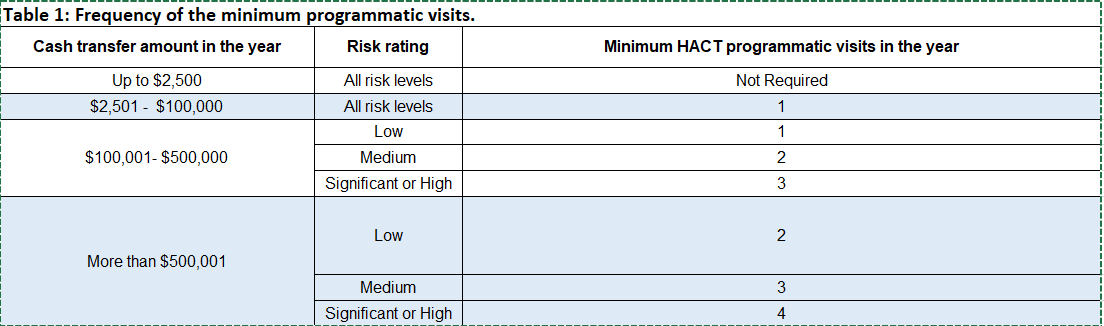
I. Minimum Programmatic Checks Required: The number of programmatic visits required is based on the Highest Risk Rating of the Implementing partner (E) and the amount of net cash transfers for the period Oct - Sept (D.) as per Table 1 below. As of March 2021, the number of required programmatic visits is determined based on the Highest Risk Rating(E) .
The Highest Risk Rating is calculated based on the “HACT Risk Rating” (F) and “SEA Risk Rating” (G), depending on which one is higher. If both risk ratings are the same, then it displays the “SEA Risk Rating”(G).
Table 1 below shows you the Frequency of Minimum Required Programmatic Visits in the Year based on the amount of Cash Transfers
J. Programmatic Checks Completed: Displays completed Programmatic Visits from January to date which have been entered in eTools Trip Management Module and Third Party Monitoring Module.
K. Liquidations for the period October to September: The amount displays the total [Direct Cash Transfer reported + Direct Payments + Reimbursements] for the period October to September. It is used to calculate the minimum required spot checks.
L. Minimum Spot Checks Required: One spot check is required when an IP has reported more than US$50,000 during the period Oct to Sept (K) The value is either 0 (for IPs receiving less than $50K) or 1 (for IPs receiving more than $50k). If an Implementing partner has a HACT Risk Rating of “Low Risk Assumed” spot checks are not required.
M. Follow-up Spot Check Required: If a min. required spot check results in significant negative findings, the Chief of Ops determines the additional assurance activities. If a follow-up spot check(s) is required, the HACT focal point inputs the number of spot checks required in the eTools Partnership Management Module - Assurance tab.
N. Total Required Spot Checks: Total required spot checks is the sum of the minimum (L.) and follow-up (M.) required spot checks.
O. Spot Checks Completed: Displays completed Spot Checks from January to date which have been entered in eTools Trip Management Module and Financial Assurance Module.
P. Required and Completed Audits: If a scheduled audit is required based on the risk based audit methodology, the HACT Focal Point indicates Yes in the eTools Partnership Management Module - Assurance tab. When the audit is completed and entered in the eTools Financial Assurance Module, the HACT dashboard will update.
Q. Outstanding Findings: Displays the sum of pending unsupported amounts from completed audited from the Financial Assurance Module.